How to Generate Bulk Phone Number Test Data
Learn how to generate large-scale synthetic phone number datasets for load testing, database seeding, performance benchmarks, and QA suites.
David Kross•
Learn how to generate large-scale synthetic phone number datasets for load testing, database seeding, performance benchmarks, and QA suites.

Testing at scale needs more than a handful of sample numbers. This guide covers how to build large, reliable bulk phone data sets for thorough application testing without touching real user information.
Bulk phone data refers to large collections of synthetic numbers used for load testing, QA, or database seeding. Unlike a handful of manual examples, this phone test dataset can contain thousands or even millions of entries.
This scale matters for performance testing, where a small sample simply can’t reveal how your system behaves under realistic, high-volume production conditions involving many simultaneous users.
Generating a large phone number dataset typically involves scripting rather than manual entry. Developers write generators that loop through valid ranges, producing synthetic phone data at whatever scale the test requires.
Keeping the generation logic simple and well-documented makes it easy for other team members to adjust the dataset size or format later without needing to fully understand the original implementation.
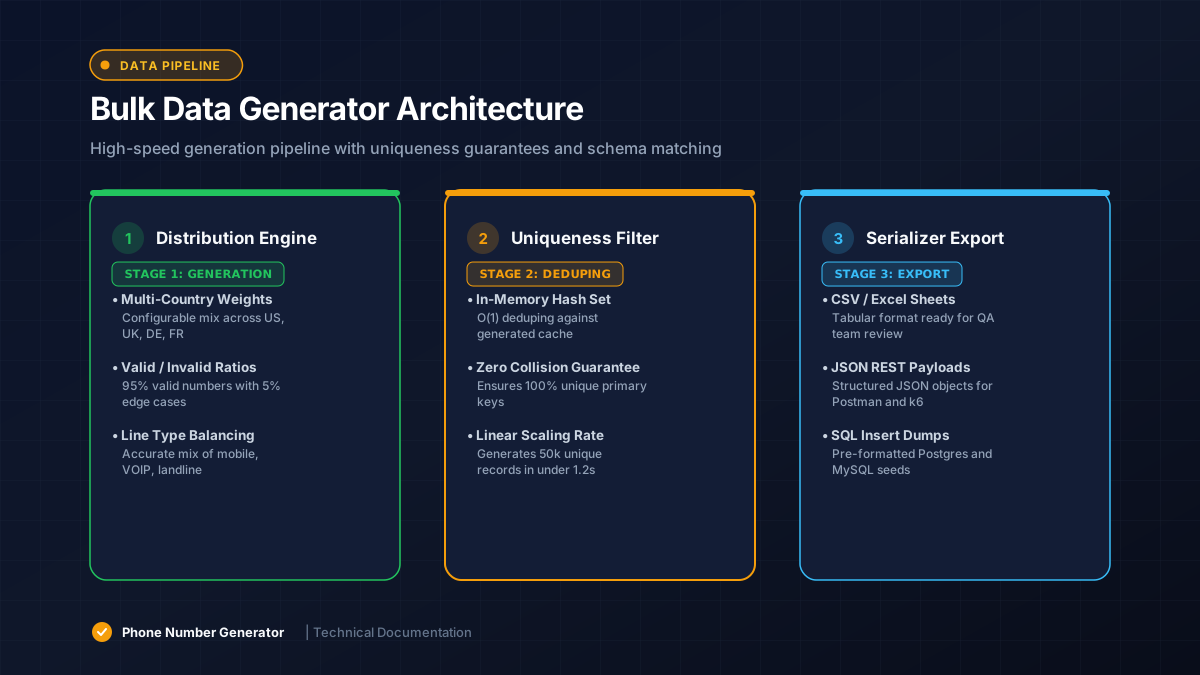
A thorough bulk test data set includes multiple formatting styles, not just one clean pattern. Mixing dashes, spaces, parentheses, and plain digit strings mirrors how real user input actually looks in production.
This variety ensures your validation and normalization logic gets properly exercised, rather than only being tested against the single tidy format a developer might default to when writing quick sample data.
A dataset containing only valid numbers gives incomplete coverage. Mixing in deliberately invalid phone dataset entries, like wrong lengths or bad characters, ensures your system correctly rejects bad data at scale too.
This combined approach makes QA dataset testing far more realistic, since production traffic always includes a mix of clean and malformed submissions from real users making genuine mistakes.
Global apps need country phone dataset coverage, not just domestic numbers. Including multiple international test dataset entries across regions catches formatting bugs that only appear with specific country patterns.
A simple approach mixes several country codes proportionally, similar to your expected real-world user base, so your test dataset reasonably reflects actual traffic patterns once launched.
Once generated, phone data export usually happens in CSV or JSON format for easy import into test databases or automated test runners. Both formats integrate cleanly with most modern testing frameworks.
| Format | Best For |
|---|---|
| CSV | Spreadsheet review, bulk database import |
| JSON | API testing, structured application data |
| SQL | Direct database seed data insertion |
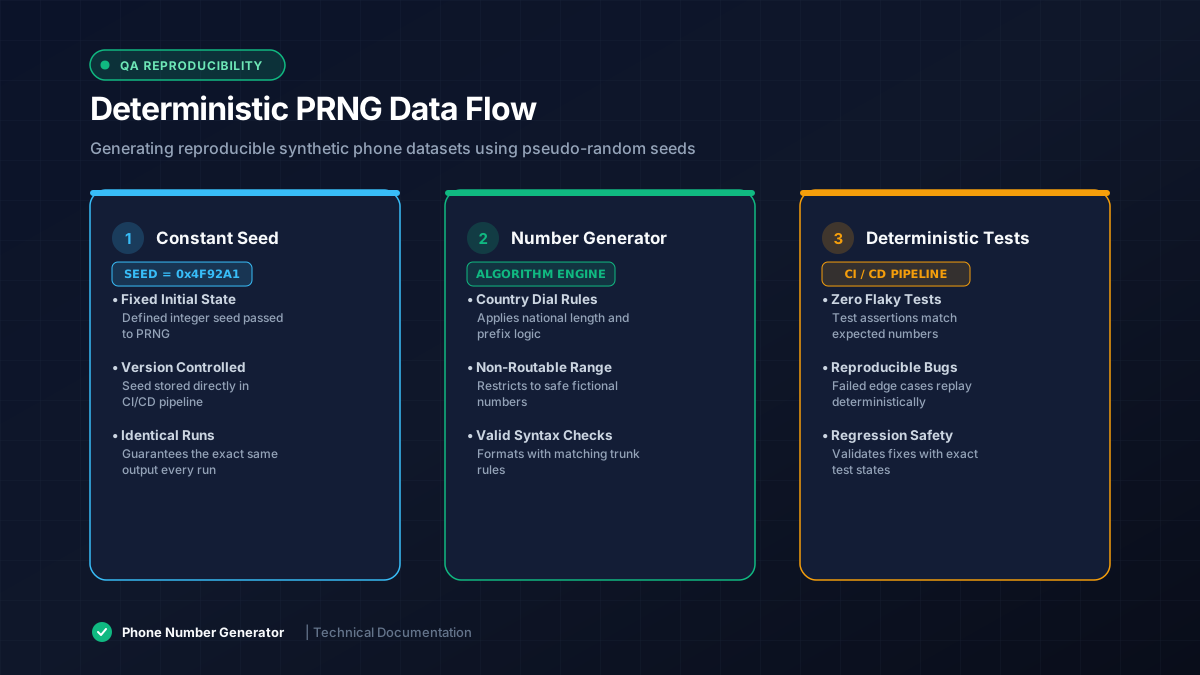
Seeded random data ensures the same generation script produces identical output every time it runs. This reproducible test data approach makes debugging far easier, since failures can be traced back to a known, consistent dataset.
Without a seed, randomness changes every run, making it much harder to reliably reproduce a bug that only appeared under specific, previously untracked data conditions during an earlier test cycle.
At scale, duplicate phone numbers can sneak into a generated dataset, especially with narrow value ranges. Adding a uniqueness check during generation prevents this, since duplicates can skew results in database or performance testing.
A simple set-based check during generation catches duplicates efficiently, even across large test dataset sizes reaching into the hundreds of thousands or millions of entries.
Clearly labeling synthetic dataset files and storing them separately from production imports prevents accidental contamination. A mislabeled bulk file has, in real cases, ended up seeding live customer databases by mistake.
Naming conventions, dedicated folders, and automated checks before any import into staging or production environments all help keep bulk test data safely contained to testing purposes only.
Well-built bulk phone data generation supports thorough, realistic testing at any scale. By mixing formats, including invalid cases, adding regional variety, and preventing duplicates, teams create a phone test dataset they can trust across their entire testing pipeline.